
A planet full of Xiaomi news
Deal Planet

This gadget shouldn’t be missing on any vacation! Great Xiaomi selfie stick with a zoom button and camera switching—just for 17 €

26. May 2025 3 min read 0 comments

Back in 2021, Xiaomi introduced an upgraded version of its selfie stick. It improved not only the look, but also the functionality.

In the Ali coupon offer

The improved selfie stick called Xiaomi Mi Zoom Selfie Stick is available on the well-known marketplace Aliexpress. Verified duty-free shipping is also available, thanks to which your package will be delivered quite quickly in the course of 10-22 days. VAT will be handled for you by the seller.

💡 Note: The zoom function works only with Xiaomi and Redmi smartphones with MIUI 12 and higher. For other smartphones, the shutter trigger function is available.

XiaomiPlanet deal

Xiaomi Mi Zoom Selfie Stick

AliExpress, duty-free delivery
Xiaomi Mi Zoom Selfie Stick
Aliexpress Standard Shipping

19,82 €You save 1,94 €
17,88 €

Price history

1,49 €cheaper than the average price
Cheapest 16,99 €Most expensive 22,27 €
Buying on AliExpress for the first time? See the guide!
More coupons
23,78 €18,54 €
IFPYWWI
Use
Updated 26. 5. 2025 on 05:55
TIPShipping via Aliexpress Standard Shipping

Aliexpress Standard Shipping is available for this product. This is the most reliable shipping method and, in most cases, it’s delivered by a courier company. Delivery time is usually 10-20 days.

When ordering from the Chinese warehouse, AliExpress will add the customs duty in your cart—approximately 3,70 € per order. When you receive the package, you won’t pay anything extra.

Track this product’s price

As soon as we post a new coupon, we’ll send you an email. You can unsubscribe from tracking anytime.

Buying on AliExpress for the first time?

This process is done through the AliExpress mobile app, where most people shop. Two things matter: don’t use Buy now and enter the coupon only in the order summary in the Promo code field. After you click Pay now, you can’t add it anymore.

  1. Copy the code and click GET THE DISCOUNTIn our article, copy the coupon and click the button GET THE DISCOUNT. The link will take you directly to the product in the AliExpress app.
  2. Use Add to cart, not Buy nowOn the product card, scroll down and click Add to cart. Don’t use the Buy now button—this skips the cart, so later you won’t have a place to enter the coupon. Before that, make sure the variant is correct: color, version, and whether it ships from an EU warehouse.
  3. Continue to Checkout via the cartA pop-up will appear: Added to cart!—tap Check it out. If it disappeared, open the cart using the icon in the bottom-right corner. In the cart, check the product and quantity, then tap the red Checkout button. Only the items marked with the red circle are included.
  4. Fill in your address and card, then look for Promo codeIn the order summary, first enter the delivery address and payment card at the top. Below that, there’s a line Promo code — expand it with the arrow on the right.
    Promo code line in the AliExpress app order summary
    Look for this line under the address and payment method.
  5. Paste the code and confirm ApplyIn the field Promo code paste the copied code and click the black Apply. The code is case-sensitive and must not contain spaces.
    Promo code box with the code and the Apply button in the AliExpress app
    Paste the code into the field and confirm by clicking the Apply button.
  6. Check your savings and payIn the section Summary expand the line Saved — you’ll see the applied coupon there as AliExpress coupons/codes. Only when Total is really lower, click Pay now.
    Saved line with the applied coupon and reduced Total in the AliExpress app
    The applied coupon will show up in the Saved line and reduce the Total.
Apply the discount again in the order summary. After you click Pay now, you can’t add a coupon anymore. If Apply shows an error, the code has either expired, doesn’t apply to your item, or your order doesn’t meet the minimum amount.
Store Coupon also belongs in the same field. — a coupon from the seller itself, which isn’t always available and changes day to day. It can’t be combined with an AliExpress coupon, so try both and go with the one that gives you more. Coins are added automatically.

Plastic has been replaced with aluminum

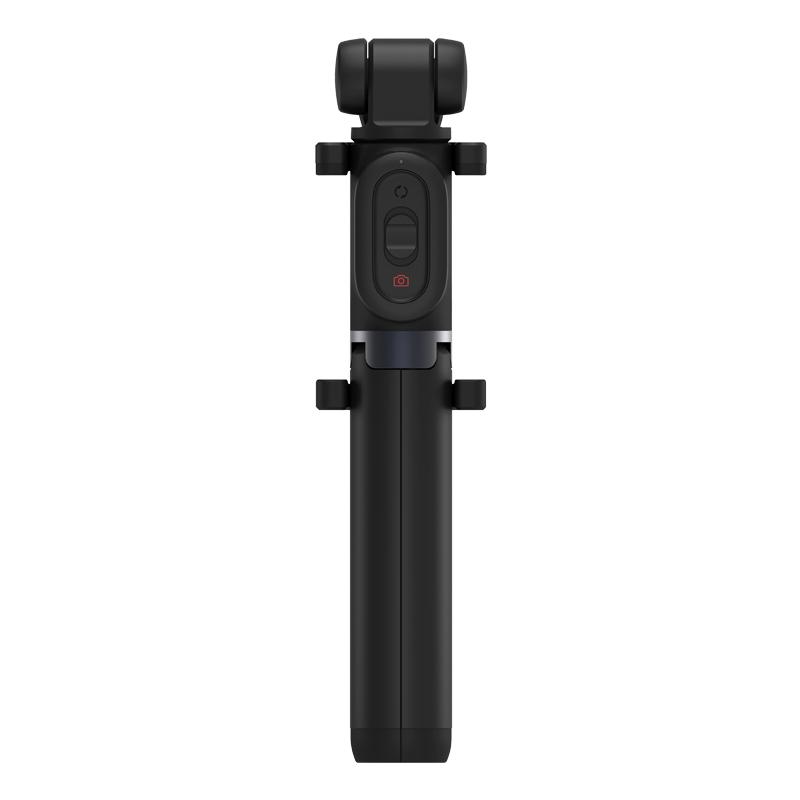
The previous generation had a plastic body that resisted scratches, but the stick itself wasn’t as rigid. The updated selfie stick offers a more durable aluminum alloy, which solves the device stiffness issues.

Xiaomi also improved the mounting system. The arm now provides a grip for mobile devices up to 89 mm. Inside, the clamps are lined with soft rubber to prevent any damage to the connected smartphone.

The stick head can be folded down to minimize size, so it can fit into a bag, for example. Weight is a nice 161 grams. Xiaomi keeps the telescopic extension system.

Ad

New features hidden in the controls

The manufacturer added a small sliding button to the stick’s handle, used to control the zoom. Zoom adjustment is even accurate to 0.1x. However, the zoom function works only with Xiaomi and Redmi smartphones with MIUI 12 and higher. For other smartphones, the shutter trigger function is available.

There’s also a shutter button and an option to switch the camera from the rear to the front and vice versa. There’s even a mode change from photo to video recording. This button module can be removed and can also serve as a camera remote shutter using wireless Bluetooth technology.

360° rotating system

In addition, the new Xiaomi selfie stick keeps its most attractive feature: a 360° rotating system, which lets you rotate the phone holder in all vertical and horizontal directions. Choosing the right angle is all up to you.

The stick handle can be easily unfolded into a simple tripod, so you can use this device as a basic photo stand.

Follow our Xiaomi Planet page so you don’t miss a thing about upcoming Xiaomi gadgets. You can also join our Facebook group, where we build an active Xiaomi community.

Add us as your preferred source on Google

Don’t miss the best coupons 📩

Subscribe and we’ll email you new coupons before they expire. We only send it once a month — no spam.

Ad Engerio