

Verdict: IMILAB EC6 Dual
Our editorial rating based on product testing.
- 2K resolution on both cameras
- simultaneous two-view recording thanks to two cameras in one body
- continuous recording and notification videos from both cameras
- clear and intuitive app interface
- a lot of incorrectly detected and false alerts for people or vehicles
- the build quality and packaging aren’t quite at their best
- only the bottom camera is tiltable, while with the top camera you can move it only manually over a smaller range
- videos aren’t completely smooth in the recording
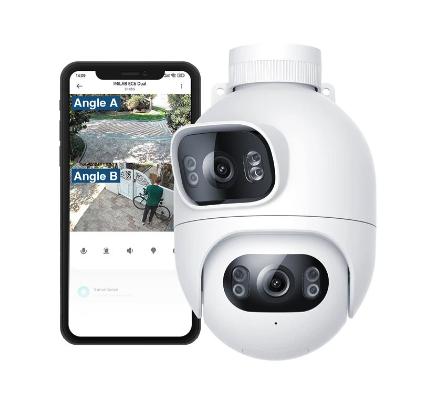
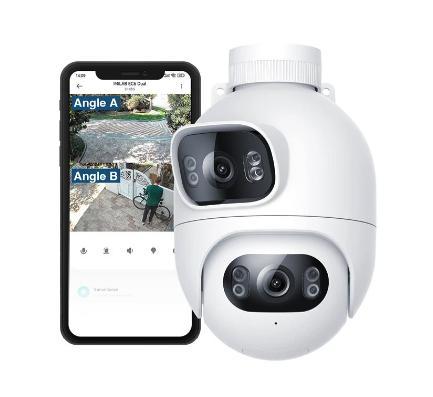
Finally, we have a camera that’s noticeably different from the typical security cameras we’re used to. As the name suggests, IMILAB EC6 Dual comes with two cameras offering high 2K resolution.
In our detailed review, we’ll take a close look at how this kind of camera works, what its pros are, and also what its cons are. Since we use the camera every day, we’ll share our personal experience from everyday use.
Where to buy IMILAB EC6 Dual?
You can order the camera from our trusted partners Gshopper and Banggood. We recommend that you use our discount coupon on Gshopper to further reduce the final price. Plus, delivery is smooth with no hidden fees and usually takes 15-25 days.
IMILAB EC6 Dual is sold exclusively in the global version, designed for all markets. In the Xiaomi Home app, it will work without any issues under European regions.
IMILAB EC6 Dual

TIPExpress delivery from a Polish warehouse without customs duty and VAT.
This product will be delivered to you express from a local Polish warehouse. Shipping from Poland usually takes 7-10 days and is handled by a courier. On delivery, you won’t pay any extra fees—no customs duty and no VAT.

TIPExpress delivery from a Slovak warehouse within 1 to 3 business days.
This product will be delivered to you express from a local Slovak warehouse. Delivery usually takes 1-3 business days and is handled by a courier. The price is final.
Technical specifications
| Model | IMILAB EC6 Dual |
|---|---|
| Dimensions | 178 x 107 x 165 mm |
| Weight | 583 g |
| Power | 110 – 220 V AC (cable length 3 m) |
| Resolution | 2K + 2K |
| Turning the top camera | manual – 10° vertical and 120° horizontal |
| Tilting the bottom camera | electronic – 360° horizontal and 100° vertical |
| Zoom | 3-x |
| Video Compression | H.265 |
| Light | 4 x IR + 4 x LED |
| Suitable for temperatures | -30 up to 60 °C |
| WiFi | version 6 / 2.4 GHz |
| Ethernet (LAN) | yes |
| Memory Card | yes (max 256 GB) |
| Detection | people / vehicles / motion in general |
| Two-way audio | yes |
| Alarm | yes |
Packaging quality and contents
The IMILAB EC6 Dual outdoor camera was delivered to us by a courier in a fairly compact box. It was wrapped only in a plastic bag, but there was no damage or box deformation during shipping.

Inside, the camera is packed the same way as the standard EC6 version that we’ve already reviewed—just bubble wrap. Accessories come in a small box and include drilling templates, screws, and wall plugs, a cover for the LAN connector, and a user manual.

The manufacturer includes everything you need for mounting, except for the tools, but overall packaging quality isn’t very high. We’d rather see the camera protected inside the box with foam inserts or rigid cardboard instead of bubble wrap.
Design and build quality
As with the standard EC6 version, the new dual-camera model is made from plastics that aren’t among the best quality. The overall impression of the packaging and the camera is similar. It’s not a premium camera, and its price reflects that.

The camera is quite large and shaped like an egg, split into two parts in the middle. The mounting bracket is an integral part of the camera design and allows you to mount it on the ceiling or wall. There’s also a LAN cable and a power cable integrated into one.

On the bottom of the camera, under a rubber cover, you’ll find a microSD card slot and a reset button. There’s also a speaker on the back and a microphone next to the lower lens.
Two cameras in one body
Of course, the most interesting part here is the cameras themselves, and we have two of them right away. Let’s start with the top one. It has 2K resolution and a pair of LED diodes for illumination. With this camera, we can’t pan/tilt via the app. However, you can rotate it manually within 120° horizontally and 10° vertically.

The lower camera also has 2K resolution and a pair of LED diodes, but it offers electronic pan/tilt rotation horizontally in the range of 360° and vertically in 100°. A huge advantage of this camera is that it simultaneously captures two different directions using the two lenses mentioned above.
Pairing with the app and mounting
IMILAB EC6 Dual works with the well-known and popular Xiaomi Home (Mi Home) app, available on the Google Play store or the AppStore. Pairing is very simple and quick. Just scan the QR code you’ll find on the cable leading from the camera and follow the steps the app guides you through.


Compared to the EC6 model, there’s one difference. Since the dual camera also has a LAN port, in the first step of pairing we choose whether you want to connect the camera to the internet via a cable or via WiFi. We chose the wireless connection.

So the next pairing steps involve selecting the WiFi network the camera should connect to, and the room you want to add it to in the app. The whole process is completely easy and fast.
As for the mounting, it’s also simple and truly anyone can handle it. The manufacturer includes screws along with wall plugs, and as we mentioned above, the package also contains a pair of drilling templates in the form of stickers. They’re used to prepare holes for the wall plugs.

We mounted the camera on a wooden garden arbor, so we didn’t need the wall plugs. We screwed the camera mount to the wooden frame of the arbor using two screws. You can also mount it to the ceiling—not only to vertical structures.

App environment with two previews
Since the camera has two lenses, we were curious how the manufacturer solved live video display in the app. You get previews from both cameras neatly stacked on top of each other, along with the control elements you already know from other Xiaomi and IMILAB cameras.


In both previews, you’ll find several buttons – switching to sleep mode, taking a photo, recording video, setting resolution, and switching to full-screen mode.
With both cameras, you can choose between the highest 2K resolution, automatic resolution based on connection quality, or 480p. Under the camera previews, there are another 5 buttons – two-way audio transfer, alarm, turn sound on / off, turn LED light on / off, and display direction buttons for rotating the lower camera.

Under these buttons, you also have quick links to recorded videos while monitoring, playback of recordings, storage management, and AI features. We’ll talk about those a bit later when we cover room monitoring.
Image quality
Both cameras have 2K resolution, but they are not identical lenses. The manufacturer doesn’t provide more specific details, but the image from them isn’t the same. The top camera is slightly weaker than the bottom one.
Video from the top camera is a bit less contrasty; the colors are cooler and more faded, less vivid, and overall it feels weaker compared to the image from the bottom camera. The bottom camera has higher contrast, so objects are easier to see, with richer color reproduction, and the image simply looks better at first glance.
Night mode
Night mode is also available on both cameras. You can choose the standard black-and-white image or a colored one created by illuminating with the LED diodes. The quality of the standard black-and-white image is quite decent. Moving people are visible clearly and quite sharply. For the colored image, the quality is slightly worse.

You can check the night video examples below:
Monitoring, alerts, and video recording
One of the most important features of security cameras is the ability to alert you to motion within the camera’s field of view. With two lenses, the IMILAB EC6 Dual monitors both views and also records video from both cameras to a memory card.

In the menu “playback”, you can simply choose which camera you want to view the recording from. It will be displayed on the timeline with highlighted events from monitoring. We used a 64 GB Kodak card, but since the camera records from two lenses, a higher capacity would be better. On a 64 GB card, you’ll fit only 2 and a half days of recording from both cameras.
The smaller issue is video smoothness. It often happened that the recording wasn’t completely smooth, or that a few seconds were skipped, which makes the playback look choppy.


If the camera first detects motion in the field of view of one camera and then, or at the same time, in the case of the other one too, it sends two notifications right away. This feature is perhaps one of the biggest advantages of a dual camera. In practice, that means we can monitor a much larger part of the area—in our case, the garden.

Each recorded video has a fixed length of 9 seconds with no way to customize it. For three months, we get free video recording from monitoring to the cloud. But when we use a microSD card, this limitation doesn’t really bother us. The monitoring videos are then saved right to the card.
Too many unnecessary motion alerts
In the motion monitoring settings, you’ll find several types of alerts. They are also included among the AI features, where it specifically recognizes people, vehicles, non-motor vehicles, screen changes, or regional monitoring.
So the camera should be able to distinguish, when detecting motion, whether it’s movement of a person, a vehicle, or just a general change in the image—where the algorithm determines that it was motion.
Unfortunately, similar to other cameras from IMILAB, we often received many alerts for people’s motion, even though there was no person in the recording. The camera even several times labeled a cat as a vehicle, or different insects on the lens as people.

False alerts even come through at low sensitivity, not to mention at high. For real motion monitoring, this camera is therefore not the best choice. Let’s hope the manufacturer improves this functionality at least partially through updates. Based on experience, though, we don’t give it much chance.
The camera can monitor the area for 24 hours per day, or only during the day from 8:00 to 20:00, at night from 20:00 to 08:00, or you can also set your own time interval. Weekends monitoring is missing, or selecting specific days combined with times.
Settings
Besides the mentioned monitoring area settings, the app offers several other customizations that are grouped into separate categories. In the video display settings, you can turn on or off the time display in the video, wide-angle correction, high dynamic range mode, or so-called smart frame. However, when we turned on the last-mentioned function, we didn’t notice any difference, so we don’t know what the smart frame is supposed to do.


The settings also include switching to sleep mode, person tracking in the sense of following—rotating the camera to follow a moving person—and setting an alarm. The alarm can be audio and/or light, and it can trigger automatically when motion is detected.


You can also simply turn off the status signal LED, adjust the volume, or view storage information via a microSD card, which you can also format.
IMILAB EC6 Dual: Final assessment
The outdoor security camera IMILAB EC6 Dual offers exceptionally interesting features, mainly thanks to two lenses, each with 2K resolution. With a single camera, you can monitor two different views. The camera also records video from both cameras and sends motion alerts from both.

It’s a shame that only the bottom camera can be rotated using a dial in the app. The top camera can only be adjusted manually, by hand. Despite the same resolution, the bottom camera is actually higher quality, with a nicer image.
Overall, the image quality is very good, and basically the only disappointment is the number of false alerts. Unfortunately, it often happens that the camera identifies animals as vehicles or people, or sends motion notifications even when it’s windy, or when insects fly past the lens—which it also evaluates as human motion.
Don’t miss the best coupons 📩
Subscribe and we’ll email you new coupons before they expire. We only send it once a month — no spam.