A planet full of Xiaomi news
Smartphones

POCO M4 Pro 5G vs POCO M3 Pro 5G: The biggest differences between two generations of the best budget smartphones

21. November 2021 3 min read 0 comments

Not long ago, the Chinese company POCO unveiled the next generation of its budget 5G smartphone at its global conference. But what are the differences compared to the previous model? Let’s take a look at the variations together.

A slightly different back and an almost identical display

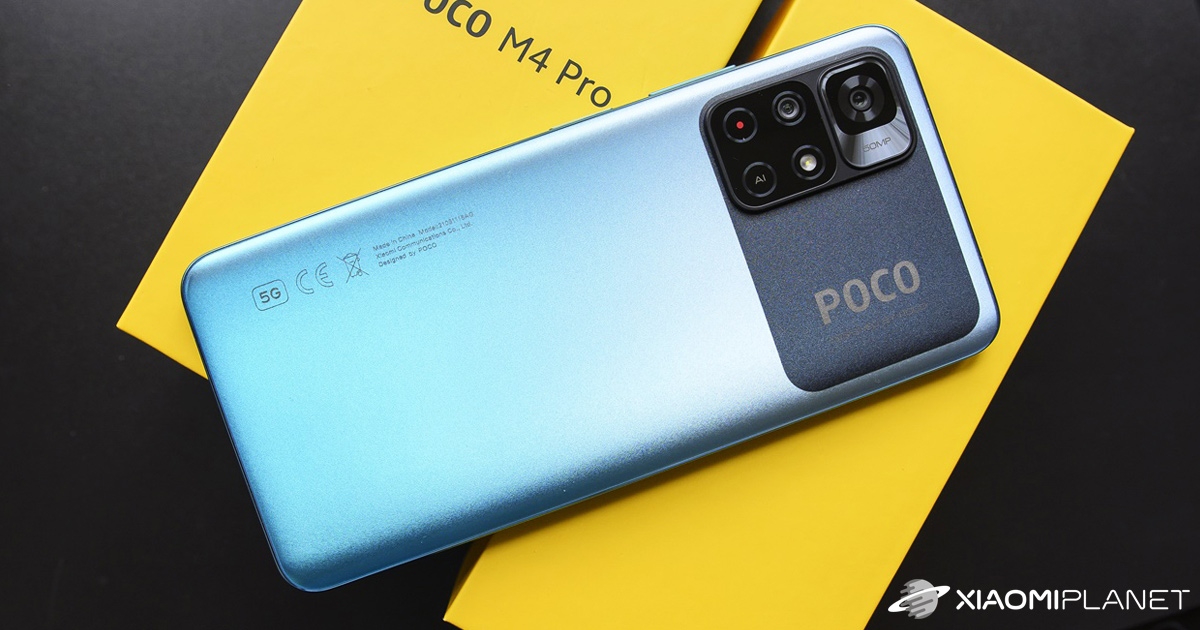
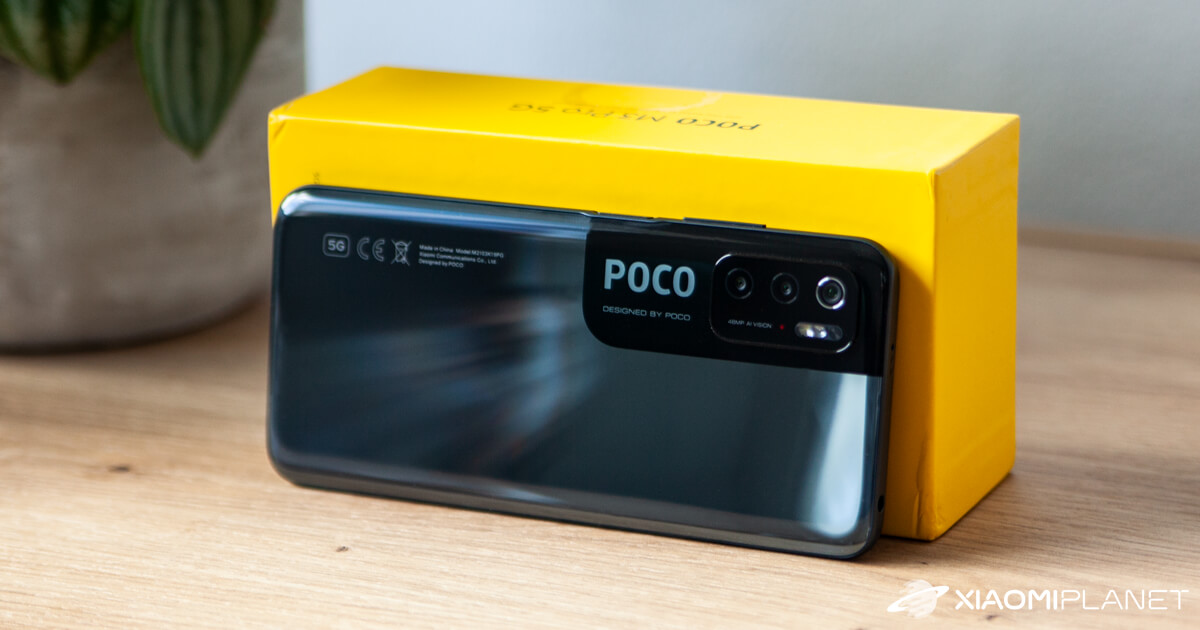
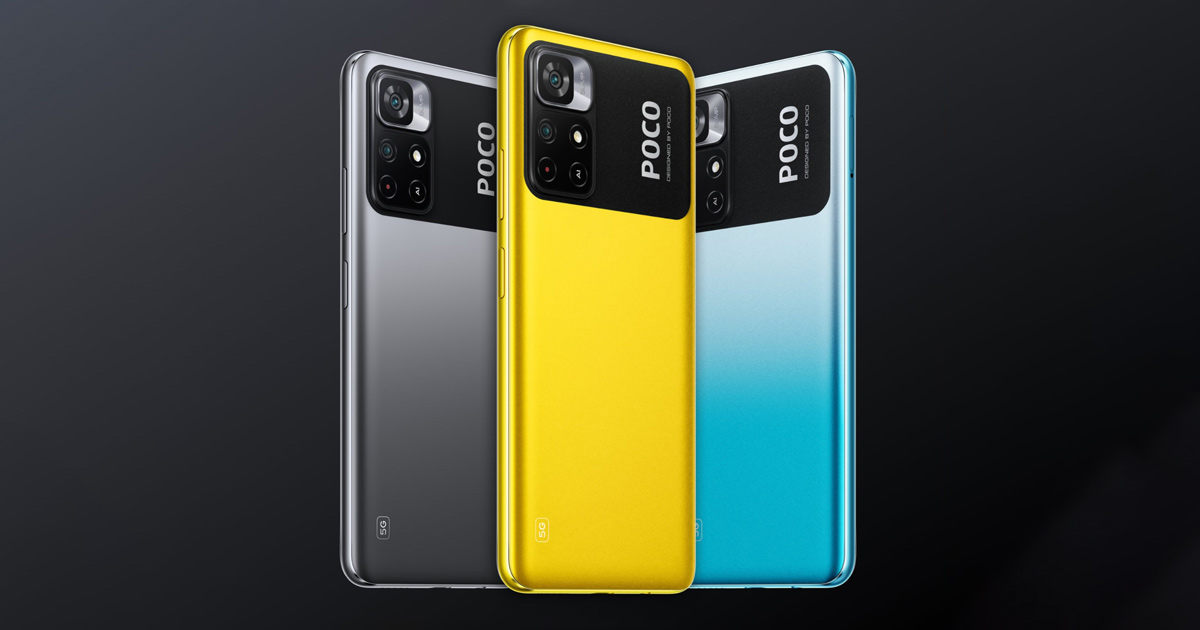
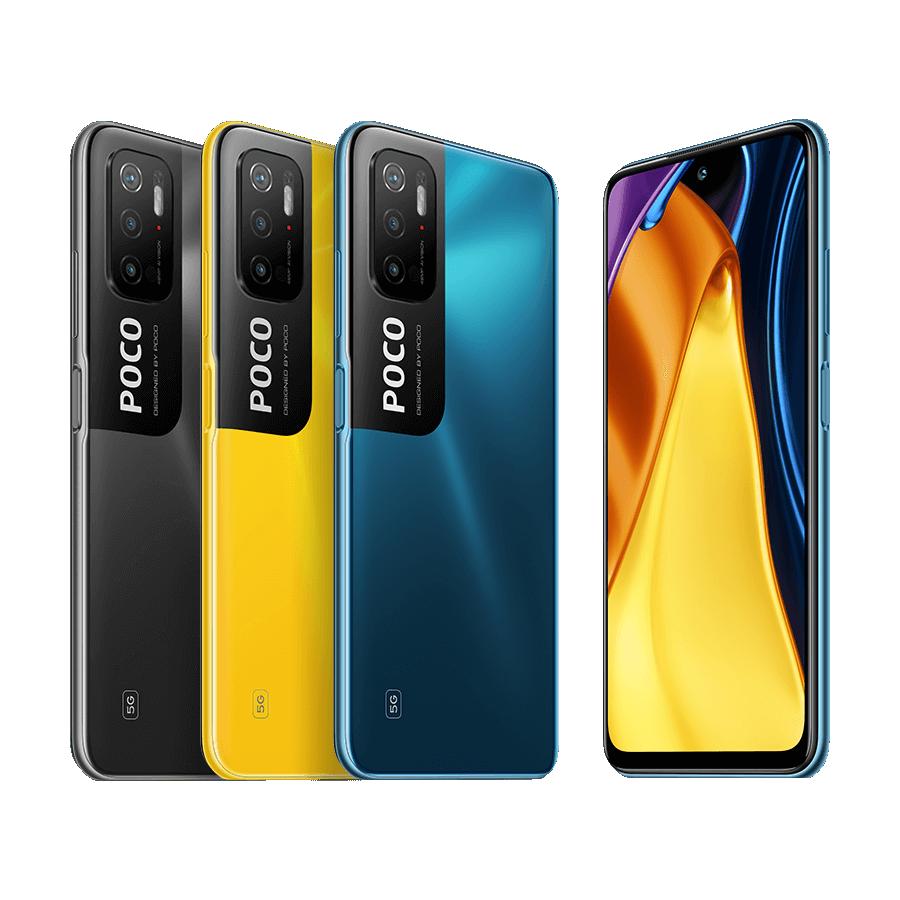
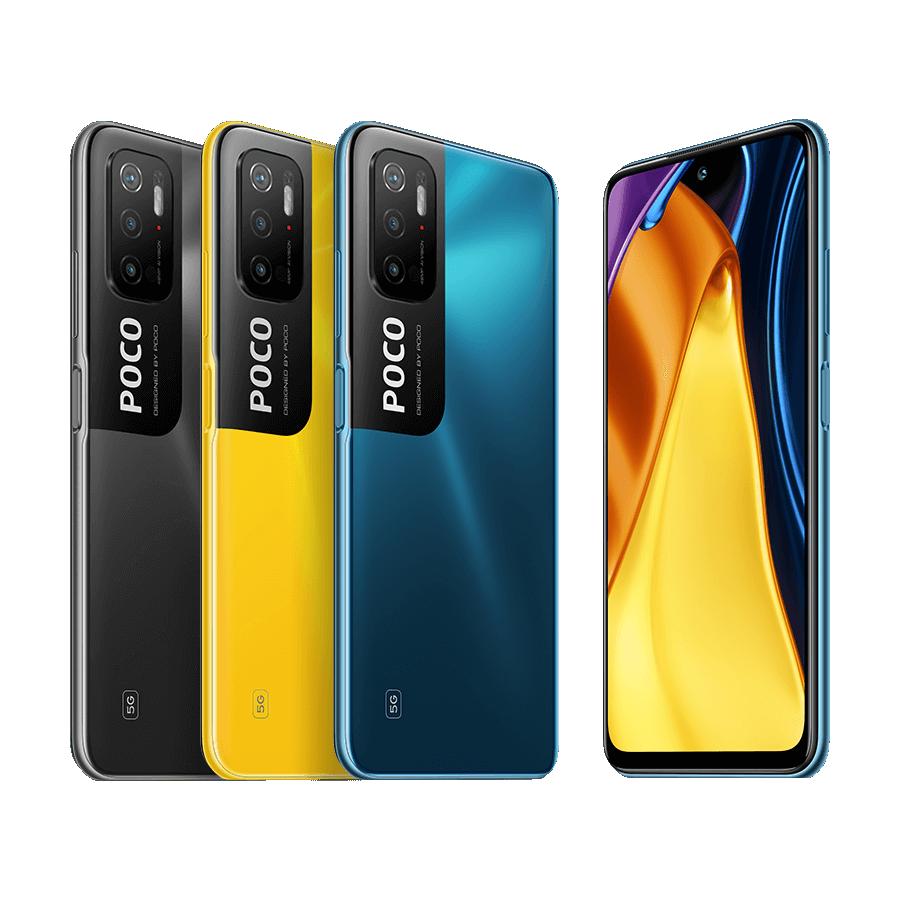
On the design side, not much has changed. The back is still plastic, and here too you’ll find an interesting POCO design. The previous model had a camera module and a black line that made it look more like the Samsung Galaxy S21 series. The new generation points to a differently directed black element with the POCO logo, referring more to the Xiaomi Mi 11 Ultra model.

The color palette is the same three-pack as with POCO M3 Pro 5G, and you can choose from black, blue, and yellow. However, the blue variant looks slightly lighter.

Since the new model has a somewhat larger display, the dimensions increased a bit, and the weight grew by an insignificant 5 grams.

When we outlined the display, there weren’t many changes there. It’s still an LCD panel, not AMOLED, with Full HD resolution and a high refresh rate of 90 Hz. The sampling rate increased from 180 to 240 Hz. Both models are protected by durable Gorilla Glass 3.

The selfie camera in the cutout is better quality. It’s down to a sensor with 16 MPx resolution compared to 8 megapixels on the POCO M3 Pro 5G.

Ad

More powerful MediaTek and finally, a wide-angle camera

The upgrade is in performance. POCO again turned to a MediaTek processor—specifically the Dimensity 810 model with 5G connectivity. But the previous model already had that too, although the performance increase is still clearly noticeable.

The processor is matched by the same up to 6 GB of DDR4 RAM, plus up to 128-gigabyte storage with microSD card support up to 1 TB.

Interesting things happened in the camera department. The resolution increased from 48 to 50 MPx, but the more interesting part is the addition of a 8-megapixel ultra-wide-angle sensor. In the previous generation, that was missing, and POCO only used a pointless 2-megapixel macro sensor there.

Faster charging, but also a higher price

There’s been no battery increase, and once again we have very decent 5 000 mAh. The charging speed was improved from 18 to 33 W. The manufacturer didn’t forget about NFC, and adds stereo speakers on top of all that.

But there’s a noticeable increase in prices. While POCO M3 Pro 5G started at 179,99 euros, the new model starts at 229 euros. Still, it’s an excellent buy.

You can read detailed reviews of both smartphones, POCO M3 Pro 5G and M4 Pro 5G, on our sister portal ChinaPlanet.

Xiaomi Planet shopping tip: GShopper has now launched direct bank transfer payments, so you can save another 4.5 % off the product price! Compared to card / Google Pay payment, you can get this product much cheaper. We described the full bank transfer payment process in our article.
XiaomiPlanet deal

POCO M3 Pro 5G Global Version

POCO M3 Pro 5G Globálna Verzia
229,00 €You save 86,20 €
142,80 €
CouponA0CEE83763BA
Is it your first time shopping on GShopper? See the guide!
Updated 28. 11. 2022 on 10:15
TIPExpress delivery from the German warehouse with no customs duty and no VAT.

This product will be delivered to you express from a local German warehouse. Delivery from Germany usually takes 7-10 days, and it’s brought by courier. When it arrives, you don’t pay any extra fees—no customs duty or VAT.

Track this product’s price

As soon as we post a new coupon, we’ll send you an email. You can unsubscribe from tracking anytime.

Is it your first time shopping on GShopper?

GShopper is an international online store with warehouses not only in China, but also directly in the EU. You can complete your order in just a few minutes. Enter your address without diacritics, choose bank transfer as the payment method—it works out cheaper than a card—and enter the discount coupon before you submit your order.

  1. Register or log inOn GShopper, you create an account, or you can log in via Google or Facebook. You can also shop without registering, but with an account you’ll see your order status and it’s easier to handle any possible claim.
  2. Get to the product using our buttonIn our article, click the GET THE DISCOUNT button—this will open exactly the product and the version the coupon applies to. Then on the product page, click Buy Now or Add to Cart.
  3. Fill in the address WITHOUT diacriticsWrite your name, street and city without accents — so Zilina, not Žilina. Foreign carrier systems can’t handle diacritics and the package may get stuck. Check your ZIP code and phone number, including the country code.
  4. Choose shipping and check the warehouseMost products come with free shipping—if Free Shipping is available, choose it. Items shipped from an EU warehouse arrive in 2 to 7 business days and don’t go through customs clearance; dispatch from China or Hong Kong takes 7 to 45 days depending on the shipping method you choose. Continue with the Next button.
  5. For payment, choose bank transfer and saveIn checkout, you pick from the available options Bank Transfer, Credit Card and PayPal. Choose bank transfer—GShopper gives you an additional discount that, depending on the product, is 3 to 4,5 % compared to card payment. In the order summary, you’ll see it as a separate line.GShopper will then show you the bank account number and the amount in the line Amount to Transfer and a reference that you need to include in the note for the recipient. You make the transfer in your bank; the account is held in EUR within the EU—so it’s a standard SEPA transfer.
    Order summary on Gshopper with discount for bank transfer
    The discount for bank transfer will appear as a separate line in the order summary.
  6. Enter the coupon and submit your orderPut the coupon into the field Discount Code and confirm with the button Apply. Only one coupon can be applied at a time. The price in the summary must be recalculated right away—if it didn’t change, the coupon wasn’t applied. Then submit your order by clicking Place Order.After payment, you’ll receive a confirmation email and you can also find your order in your account under the section My Orders.
    Discount Code field in the Gshopper checkout with an Apply button
    You’ll find the coupon box at checkout under the payment method selection.
Enter the coupon before you click on Place Order. A discount won’t be added automatically to the completed order. If you forget the promo code, you’ll have to write via [email protected] — they may not have to comply.
You can change or cancel your order within 12 hours e-mail to [email protected]. Warranty varies by category: Xiaomi phones, Redmi and POCO have 24 months, tablets and e-scooters 12 months, earbuds, smartwatches and other Xiaomi products 6 months.
Our extra service with VIP support — we’ll handle the order on Gshopper for you and ship it straight to your address.

If you don’t have experience buying on Gshopper, payments don’t go through, or coupon use doesn’t work for you, we offer an order handling service directly to your address for our readers and customers. You transfer the money to our account and we place the order directly to your address. This way, you won’t have to worry about a failed payment or applying the coupon, and you can be sure the entire order will go through correctly 100 %. In addition, you automatically get our VIP support — if any issues arise with the shipment, we handle them for you and assist with filing a claim. The fee for this service is €15 extra of the product price. You can contact us by email at info(@)xiaomiplanet.sk or on Messenger, where we’re constantly active.


XiaomiPlanet deal

POCO M4 Pro 5G Global Version

POCO M4 Pro 5G Globálna Verzia
299,00 €You save 116,26 €
182,74 €
CouponA5AD2D304A40
Is it your first time shopping on GShopper? See the guide!
Updated 5. 1. 2023 on 10:35
TIPExpress delivery from the German warehouse with no customs duty and no VAT.

This product will be delivered to you express from a local German warehouse. Delivery from Germany usually takes 7-10 days, and it’s brought by courier. When it arrives, you don’t pay any extra fees—no customs duty or VAT.

Track this product’s price

As soon as we post a new coupon, we’ll send you an email. You can unsubscribe from tracking anytime.

Is it your first time shopping on GShopper?

GShopper is an international online store with warehouses not only in China, but also directly in the EU. You can complete your order in just a few minutes. Enter your address without diacritics, choose bank transfer as the payment method—it works out cheaper than a card—and enter the discount coupon before you submit your order.

  1. Register or log inOn GShopper, you create an account, or you can log in via Google or Facebook. You can also shop without registering, but with an account you’ll see your order status and it’s easier to handle any possible claim.
  2. Get to the product using our buttonIn our article, click the GET THE DISCOUNT button—this will open exactly the product and the version the coupon applies to. Then on the product page, click Buy Now or Add to Cart.
  3. Fill in the address WITHOUT diacriticsWrite your name, street and city without accents — so Zilina, not Žilina. Foreign carrier systems can’t handle diacritics and the package may get stuck. Check your ZIP code and phone number, including the country code.
  4. Choose shipping and check the warehouseMost products come with free shipping—if Free Shipping is available, choose it. Items shipped from an EU warehouse arrive in 2 to 7 business days and don’t go through customs clearance; dispatch from China or Hong Kong takes 7 to 45 days depending on the shipping method you choose. Continue with the Next button.
  5. For payment, choose bank transfer and saveIn checkout, you pick from the available options Bank Transfer, Credit Card and PayPal. Choose bank transfer—GShopper gives you an additional discount that, depending on the product, is 3 to 4,5 % compared to card payment. In the order summary, you’ll see it as a separate line.GShopper will then show you the bank account number and the amount in the line Amount to Transfer and a reference that you need to include in the note for the recipient. You make the transfer in your bank; the account is held in EUR within the EU—so it’s a standard SEPA transfer.
    Order summary on Gshopper with discount for bank transfer
    The discount for bank transfer will appear as a separate line in the order summary.
  6. Enter the coupon and submit your orderPut the coupon into the field Discount Code and confirm with the button Apply. Only one coupon can be applied at a time. The price in the summary must be recalculated right away—if it didn’t change, the coupon wasn’t applied. Then submit your order by clicking Place Order.After payment, you’ll receive a confirmation email and you can also find your order in your account under the section My Orders.
    Discount Code field in the Gshopper checkout with an Apply button
    You’ll find the coupon box at checkout under the payment method selection.
Enter the coupon before you click on Place Order. A discount won’t be added automatically to the completed order. If you forget the promo code, you’ll have to write via [email protected] — they may not have to comply.
You can change or cancel your order within 12 hours e-mail to [email protected]. Warranty varies by category: Xiaomi phones, Redmi and POCO have 24 months, tablets and e-scooters 12 months, earbuds, smartwatches and other Xiaomi products 6 months.

What do you think of the intergenerational difference? Do you think there’s a reason to upgrade to the latest POCO M4 Pro 5G generation? Let us know in the comments below the article. Follow XiaomiPlanet, sign up for news updates, and join our Facebook group, where we build an active Xiaomi community.

Add us as your preferred source on Google

Don’t miss the best coupons 📩

Subscribe and we’ll email you new coupons before they expire. We only send it once a month — no spam.

Ad Engerio