
Verdict: Xiaomi Smart Doorbell 3S
Our editorial rating based on product testing.
- standard doorbell design with a backlit button
- simple and quick installation
- anti-theft protection with an alarm and pairing to a Xiaomi account
- almost no delay between pressing the doorbell button and receiving a notification on your smartphone
- monitoring the area in the camera's field of view, so it also works as a security camera
- glossy black finish that shows lots of fingerprints and dirt
- the image is not always perfectly sharp
- to steal the doorbell, all you need is a pin to open the SIM slot in smartphones
A smart doorbell with a camera is nothing new in today's modern age. Chinese giant Xiaomi already has several in its lineup, and we tested the latest version labeled Xiaomi Smart Doorbell 3S.
In the review, we'll first take a look at the doorbell's parameters, go through its installation and pairing, and then introduce its functions and reliability.
Where to buy Xiaomi Smart Doorbell 3S?
In cooperation with our close partner Gshopper, we secured availability of the latest Xiaomi smart doorbell Xiaomi Smart Doorbell 3S, which was introduced to the market only this year. This is the original global version, which works under European regions in the Xiaomi Home app.
In addition to availability, we also secured an exclusive coupon with a special price that no one else will offer you. The advantage is completely free shipping and hassle-free duty-free delivery within 15 days.
Xiaomi Smart Doorbell 3S Global Version
 SK warehouse
TIPExpress delivery from a Slovak warehouse within 1 to 3 business days.
This product will be delivered to you express from a local Slovak warehouse. Delivery usually takes 1-3 business days and is handled by a courier. The price is final.
Technical specifications
| Model | Xiaomi Smart Doorbell 3S (MJML07-FJ) |
|---|---|
| Dimensions of the outdoor unit | 146 × 52 × 29 mm |
| IP rating | IP65 |
| Battery | 5200 mAh |
| Input | 5V/2A (USB-C port); 8 – 24 VAC; 10 – 40 VA; 50 – 60 Hz |
| WiFi | IEEE 802.11b/g/n/ax 2.4GHz |
| Video resolution | 2K |
| Infrared light | 940 nm |
| Two-way audio | yes |
| Operating temperature | -20 to 50 ℃ |
| Indoor unit (chime) | MJJSQ04-FJ |
| Indoor unit dimensions | 60 × 60 × 39.6 mm |
| Input | 5V/1A USB-C |
| Wireless connectivity | RF 433 MHz |
| Operating temperature | 0 to 45 °C |
Contents and packaging quality
Xiaomi Smart Doorbell 3S, like most Xiaomi smart home devices, comes packaged in a compact white cardboard box. Inside you'll find the doorbell itself, the chime speaker, a cable for connecting to the adapter, a mounting stand, a wedge for angling the doorbell, and installation accessories (wall plugs, screws, and cables).


Xiaomi also packs the main components in plastic bags and the accessories in a small box. Overall, we rate the quality and contents of the package positively.
Design and build quality
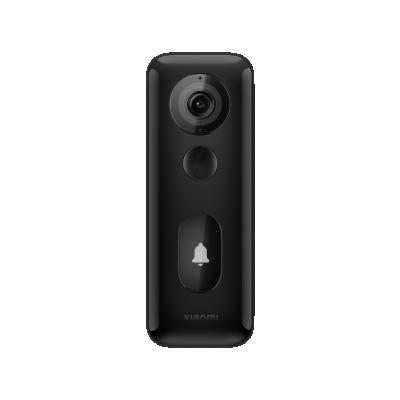
The doorbell design is standard, exactly what you'd expect from such a product. Xiaomi sticks to a proven design type. The whole system consists of a doorbell with a camera and a chime module with a speaker, which is actually the indoor unit.

The doorbell measures 146 × 52 × 29 mm, and on the front you'll find, besides the camera lens, a PIR sensor and a button with a doorbell symbol that is backlit. At the bottom there is a speaker and a small hole for removing it from the stand. On the back there is a USB-C charging port and a reset button for the device.

The indoor unit basically just acts as a speaker for playing the ringtone tone indoors. Its dimensions are only 60 x 60 x 39,6 mm. It connects to the power outlet via a USB-C cable and includes just one single button. This is used to pair it with an external unit.
Doorbell installation
The installation itself is very easy and intuitive. To mount the external unit to the entrance door or gate, we first need to install the base, which serves as a stand for the doorbell.

For this purpose, the manufacturer includes wall plugs and screws, but they are fairly short and weak. If we don’t want to drill for any reason, we can also attach the base using a double-sided sticker, which is also included in the package.

In the box, you’ll also find an additional base, so you can tilt the doorbell to one side. It’s especially useful when installing it next to the door, on a side wall.
As for the indoor unit, you simply plug it into the power supply and place it within range of the wireless signal.
Connect and add to Xiaomi Home
The first steps involve plugging it in and adding it to the Xiaomi Home app via your smartphone. If you want to use the doorbell on battery, you just need to insert it into the stand. If your wiring is ready, you can also connect the doorbell to the power circuit, which frees you from charging.
Pairing with the app is simple, and the steps are basically the same as with other Xiaomi smart products. In our case, however, the smartphone couldn’t find the doorbell nearby, so we had to connect to its WiFi network.


After successful pairing, you’ll see the Xiaomi Smart Doorbell 3S among your devices in your smart home. You can name it however you like and assign it to one of the rooms.
As for the indoor unit, in our case it was paired and worked automatically right after connecting it to the power outlet. If not, simply pair it with the outdoor unit using the single button that the indoor unit includes.
Environment in the app
The Xiaomi Smart Doorbell 3S environment in the Xiaomi Home app is simple and well organized. On the main screen, you can see the activity entries from the last 7 days in a list, including small previews and an event description.


There’s also a button to turn on live image viewing. With this option, we can capture video footage, a photo, or talk to the person at the doorbell, and even play a pre-recorded audio message to them.
How the doorbell works
If someone presses the button on the outdoor unit, we immediately receive a notification in the Xioami Home app with the message “Someone rang the doorbell” (someone rang). There’s almost no delay.

Once you open the notification, you’ll get a real-time mode where you can see the live video with the ability to respond to the ringing mentioned above. Communication with the person at the doorbell is smooth if you have a good internet connection. With a weak connection, you’ll notice a delay in the audio compared to the video. A voice changer is also available.
With a standard ring via the button on the outdoor unit, the app records a three-second clip, which you can also check later in the history of the last few days.
Security camera mode
The Xiaomi Smart Doorbell 3S also offers monitoring within its field of view. So it can function as a security camera as well, since it sends motion alerts.

When motion is detected, it records a short, a few-seconds video with the message “Someone is at the door” or “Someone passed by”, which in other words means someone is at the doorbell or someone walked by.
Videos are saved to the cloud, and the last 3 days are available for free. Monitoring has three sensitivity levels and can work all day or only within a selected time interval. Unfortunately, the interval can be only one, uninterrupted.

If we don’t want to monitor the entire field of view, we can choose only a specific part. However, this kind of zone customization is not very precise, and the doorbell also records activities outside the selected zone.


The settings offer an option to delay video recording in the range of 0 to 10 seconds. You can also set the interval between individual videos, which can be 0, 5, 15, 30, 60 or 180 seconds. Similarly, you can set the maximum video length, but here you only have 3 options: 10, 20 or 30 seconds.
Video quality and night mode
The Xiaomi Smart Doorbell 3S records video in 2K resolution and its quality is quite good. It’s not any kind of top-tier image, despite the 2K resolution, but for a doorbell the quality is good. You can watch a short sample video below:
The colors are sufficiently vivid, with good contrast, but the sharpness isn’t quite the best even at maximum resolution. As we mentioned, for the needs of a video doorbell, this kind of quality is totally enough—so we’re satisfied with the picture quality.
Night video is a bit worse. With moving people, faces are harder to recognize, and compared to the daytime video quality, the drop here is significant.
Security
Many people are worried about the doorbell being stolen, especially if it’s placed somewhere that’s immediately accessible from the street. The manufacturer also thought about this threat, and therefore implemented an alarm that triggers when the external unit of the doorbell is forcibly detached. It also sends a notification to your smartphone about this event.

Moreover, while it’s paired to our account in the Xiaomi Home app, nobody will be able to pair it after a theft until we remove it from our account.
However, there’s one big weakness. For a standard removal of the doorbell from its base, all you need is a pin—just like the one used to open the SIM slot on a smartphone. The manufacturer could have chosen a more unusual key instead, one that isn’t commonly available.
Settings
Besides the monitoring-related settings mentioned above, the doorbell also offers a few general settings. The basic setting lets you choose between standard and real-time mode.


In standard mode, you can view live video only when someone presses the button on the doorbell. In real-time mode, you can switch to live video anytime. You can also adjust the doorbell’s and the internal unit’s volume and ringtone. However, there are only three melodies for the outdoor unit and four for the indoor unit.


There’s also an automatic reply that you can use, for example, when you’re away. You can also record your own message here and schedule the mode for selected days and times.
Runtime on a single charge
We started using the doorbell at a capacity of 86%. We used it heavily especially during the first days. After that, we rang it 5-times every day, and overall the capacity dropped by an average of 1 % per day.

Xiaomi states that the battery lasts about 4 months, so charging would be enough just three times a year. If the capacity dropped daily by 1 %, as it did in our test, the doorbell would run out in under 3 months. In a typical household, though, nobody rings every day 5-times, so the battery life claimed by the manufacturer seems quite realistic in this case.
What changed since the Xiaomi Smart Doorbell 3
Before the final assessment, let’s look at the changes the new version brings compared to the older Xiaomi Smart Doorbell 3 model. In the older version mentioned, IP65 certification was missing, as well as the option to mount it with a direct connection to the mains.
The newest model also supports WiFi in version 6 and allows adjusting the monitored zone in the camera’s field of view. The night mode has been improved, as has energy consumption monitoring.
Xiaomi Smart Doorbell 3S: Final assessment
The Xiaomi Smart Doorbell 3S is a smart video doorbell that offers 2K resolution. After pressing the doorbell button, it instantly sends a push notification to your smartphone, where you can conveniently see who’s ringing and respond right away.

The picture quality is good, although it’s slightly weaker compared to some security cameras. The quality of the audio transmission depends a lot on the strength of the wireless signal, since the doorbell connects to your home WiFi network.
Overall, it’s a great product and during our testing we didn’t notice any major issues. On the other hand, it won’t really surprise you with anything—rather, we’d say it’s a typical smart video doorbell.
Don’t miss the best coupons 📩
Subscribe and we’ll email you new coupons before they expire. We only send it once a month — no spam.