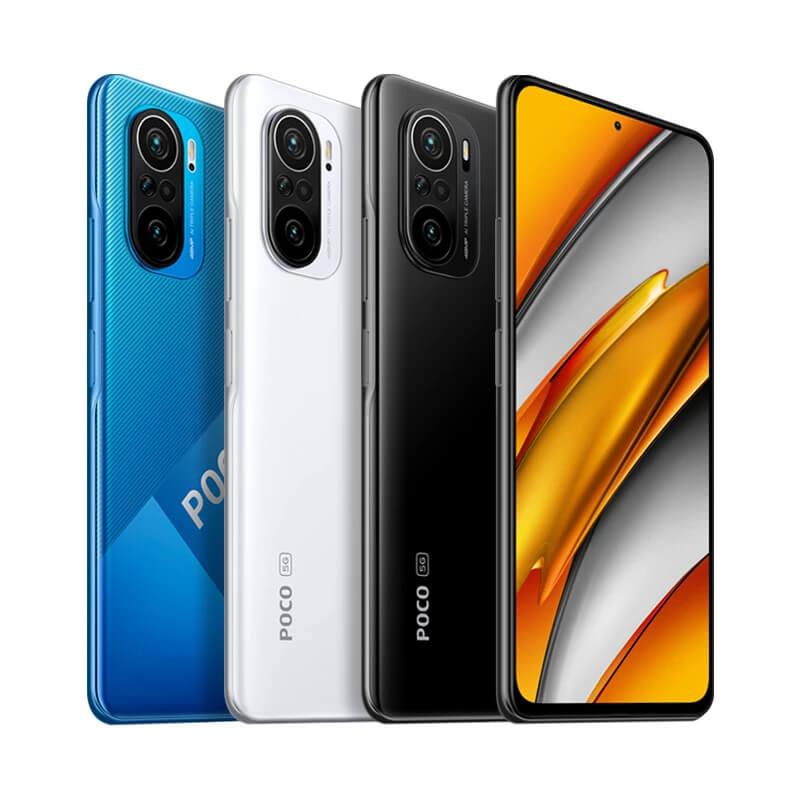
We often get the question: which smartphone under €300 is the best? Some of the best-selling models right now are from Xiaomi’s sub-brands. Which of the two, POCO F3 vs Redmi Note 10 Pro, is worth more?
In this comparison, we’ll look at performance differences, the design of both models, battery life on a single charge, and we’ll also compare the cameras.
Technical specifications
POCO F3
Redmi Note 10 Pro
Dimensions
163.7 × 76.4 × 7.8 mm
164 × 76.5 × 8.1 mm
Weight
196 g
193 g
Display
AMOLED DotDisplay / 6.67"
AMOLED DotDisplay / 6.67"
Resolution
2400 × 1080 px
2400 × 1080 px
Brightness
1300 nits
1200 nits
Refresh rate
120 Hz
120 Hz
Sampling rate
360 Hz
240 Hz
Processor
Qualcomm Snapdragon 870 (7 nm)
Qualcomm Snapdragon 732G (8 nm)
5G support
yes
no
Graphics
Adreno 650
Adreno 618
RAM
6 / 8 GB LPDDR5
6 / 8 LPDDR4X
Internal storage
128 / 256 GB UFS 3.1
64 / 128 / 256 GB UFS 2.2
microSD support
no
yes
Main camera:
48 MPx
108 MPx
f/1.79 aperture
f/1.9 aperture
4K 30 fps
4K 30fps
Other cameras:
8 MPx ultra-wide-angle (119°) f/2.4
8 MPx ultra-wide-angle (118°) f/2.2
5 MPx telemacro f/2.4
5 MPx telemacro f/2.4
2 MPx depth sensor f/2.4
Selfie camera
20 Mpx f/2.45
16 MPx f/2.45
Connectivity
Bluetooth 5.1 / WiFi 6
Bluetooth 5.1 / WiFi 5
NFC
yes
yes
Speaker
dual speakers
dual speakers
3.5 mm jack
no
yes
Water resistance
no
IP53
Battery and charging
4520 mAh / 33W charging
5020 mAh / 33W charging
Dimensions, design, and build quality
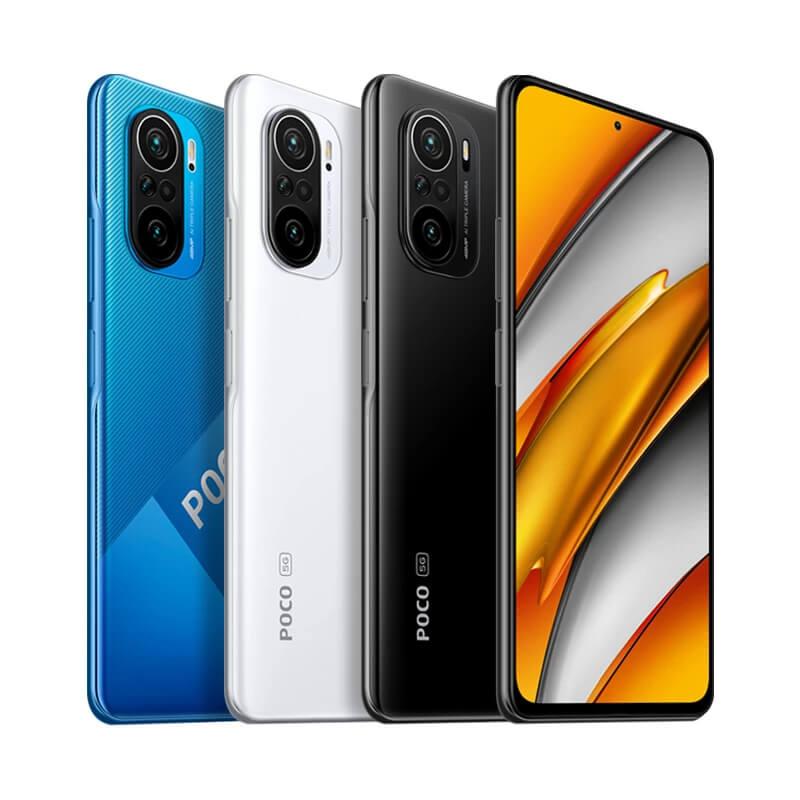
The dimensions of both smartphones are very similar. Redmi Note 10 Pro is slightly thicker thanks to the larger battery, but both models feel great in the hand due to the rounded edges of the back cover. From the front, the phones look almost identical. As for button placement, POCO F3 has the SIM card slot on the bottom, while Redmi Note 10 Pro has it on the left side edge.
Both models are plastic, and the back covers are fingerprint-magnet surfaces—though the prints are more visible on POCO F3 because of its mirror-like finish. The design is subjective, but if we had to choose based purely on looks, it would be POCO F3. We like the camera module on this model more, and it also sticks out less from the phone body.
Ad
Display
We’re happy that even in the mid-range, we can talk about AMOLED displays. In both cases, they’re 6.67″ in size, with a resolution of 2400 x 1080 px and a very small punch-hole for the front camera in the middle of the top area. They’re not top-tier AMOLED panels, but they’re definitely not bad.
POCO F3 on the left, Redmi Note 10 Pro on the right
Another shared spec is the maximum display refresh rate – 120 Hz. Still, POCO F3 has a slight advantage with higher brightness (1300 nits vs 1200 nits) and a higher sampling rate (360 Hz vs 240 Hz).
On both smartphones, we used the same display settings, but you can tell at first glance that the Redmi Note 10 Pro’s screen has cooler colors: white looks whiter and the overall color contrast is higher. POCO F3 shows noticeably warmer colors, with a slight yellow tint. Overall, we had a better feel with the POCO F3 display, where the higher sampling rate is also clearly reflected (up to 30 %).
Performance and memory
On the performance side, we’re dealing with processors from American Qualcomm. POCO F3 comes with Snapdragon 870, manufactured using a 7 nm process, while Redmi Note 10 Pro uses Snapdragon 732G, made on a 8 nm technology. The maximum clock speed of Snapdragon 870 is 3.2 GHz, while Snapdragon 732G reaches 2.3 GHz at maximum.
On POCO F3, the processor is supported by the Adreno 650 graphics chip, while on Redmi Note 10 Pro it’s Adreno 618. As for memory, there are different configurations. With POCO F3, you can choose between 6 or 8 GB of LPDDR5 RAM, plus internal storage of either 128 or 256 GB UFS 3.1.
POCO F3
Redmi Note 10 Pro
Redmi Note 10 Pro also has a pair of RAM memory versions – 6 or 8 GB, but using the older LPDDR4X technology. The storage can come with capacities of 64, 128, or 256 GB of UFS 2.2 type.
As you can see from the specs, POCO F3 is the clear winner here. It has a significantly better processor, faster storage, and faster RAM. In the well-known AnTuTu benchmark, POCO F3 scored 650 785, while Redmi Note 10 Pro didn’t even reach half, with just 297 505 points. POCO also supports WiFi 6 and 5G networks, which are missing on the Redmi model.
Ad
Unlocking options
The smartphones have a fingerprint reader on the right side. Unlike most smartphones, where we’re used to having the reader slightly recessed into the body for better tactility, here it’s raised a bit above the phone’s surface level. However, it’s never been an issue—we can always find it and unlock successfully on the first try.
Fingerprint readers look almost identical. In terms of functionality, both are very reliable and accurate. We didn’t encounter any issues with them. They aren’t among the very fastest on the market, but for smartphones in this category, they’re a very solid option. The delay between placing your finger and unlocking is noticeable, but it doesn’t really get in the way.
The second option is unlocking with your face, which you scan. This works only with the front camera, so it isn’t very usable in the dark. During the day, though, face unlocking works very reliably and—most importantly—very quickly.
Camera comparison
48 MP camera vs 108 MP camera – based on the number of megapixels, Redmi Note 10 Pro is the clear winner. But is this spec really that important, and does it show in photo quality? We took several similar shots using both smartphones at the same time, and here are the results.
Redmi Note 10 Pro
POCO F3
Let’s start with the main camera. At first glance, the difference isn’t really visible, but if you look closer, you’ll notice warmer colors in photos from Redmi Note 10 Pro, while POCO F3 shows cooler tones. If we zoom in slightly, Redmi Note 10 Pro offers more detail, and its photos are a bit sharper with more visible detail. Sometimes, however, the warm colors on Redmi Note 10 Pro look less natural.
Redmi Note 10 Pro
POCO F3
In worse lighting, the quality drops, but more noticeably on the POCO F3 than on the Redmi Note 10 Pro, which you can see especially when you zoom in less. In low-light shots, photos are less sharp, but the noise isn’t very prominent.
Redmi Note 10 Pro
POCO F3
The ultra-wide and telemacro photos follow the same pattern. Redmi Note 10 Pro photos look a bit nicer, are sharper, have warmer colors, and show more detail.
Redmi Note 10 Pro
POCO F3
Redmi Note 10 Pro
POCO F3
Both models also include a night mode with a fairly decent output. Photos from Redmi Note 10 Pro are quite good even without night mode, while POCO F3 is noticeably worse.
A photo taken without night mode on the POCO is rather blurry—the lighting is overexposed and the details disappear. With night mode it’s better, but Redmi Note 10 Pro still comes out on top, making it the overall winner in this category.
Redmi Note 10 Pro without night mode
POCO F3 without night mode
Redmi Note 10 Pro with night mode
POCO F3 with night mode
Runtime on a single charge
The battery in POCO F3 has a lower capacity (4520 mAh) than in Redmi Note 10 Pro (5020 mAh). That also translates to shorter battery life for the POCO model. In real use, we had to charge POCO F3 almost every day, while with Redmi Note 10 Pro we also managed to reach up to 2 days a few times. It all depends on how you use your smartphone, but in general, the Redmi model does better.
As for charging, both manufacturers include a 33 W charger with the smartphones, so charging speed is the same. Because Redmi Note 10 Pro has a higher battery capacity, charging takes a little longer. Below, you can compare the charging time of both models. We used the same charger and connected the phone to it when the battery capacity dropped to 20 %:
POCO F3
Redmi Note 10 Pro
50 %
15 minutes
19 minutes
75 %
38 minutes
45 minutes
90 %
47 minutes
56 minutes
100 %
1 hour 3 minutes
1 hour 14 minutes
Ad
Price and availability of the smartphones
POCO F3 is currently available from international sellers Banggood, Edwaybuy, and DHGate. At the time of writing this article, its price has dropped significantly, and in the lowest configuration (6 + 128 GB) it’s around 280 EUR. It’s available in a European warehouse, which is great thanks to fast delivery.
Xiaomi Planet shopping tip: GShopper has now launched direct bank transfer payments, so you can save another 4.5 % off the product price! Compared to card / Google Pay payment, you can get this product much cheaper. We described the full bank transfer payment process in our article.
Is it your first time shopping on GShopper?See the guide!
Updated 10. 10. 2022 on 09:04
TIPExpress delivery from the German warehouse with no customs duty and no VAT.
This product will be delivered to you express from a local German warehouse. Delivery from Germany usually takes 7-10 days, and it’s brought by courier. When it arrives, you don’t pay any extra fees—no customs duty or VAT.
Is it your first time shopping on GShopper?See the guide!
Updated 10. 10. 2022 on 09:04
TIPExpress delivery from the German warehouse with no customs duty and no VAT.
This product will be delivered to you express from a local German warehouse. Delivery from Germany usually takes 7-10 days, and it’s brought by courier. When it arrives, you don’t pay any extra fees—no customs duty or VAT.
Our extra service with VIP support — we’ll handle the order on Gshopper for you and ship it straight to your address.
If you don’t have experience buying on Gshopper, payments don’t go through, or coupon use doesn’t work for you, we offer an order handling service directly to your address for our readers and customers. You transfer the money to our account and we place the order directly to your address. This way, you won’t have to worry about a failed payment or applying the coupon, and you can be sure the entire order will go through correctly 100 %. In addition, you automatically get our VIP support — if any issues arise with the shipment, we handle them for you and assist with filing a claim. The fee for this service is €15 extra of the product price. You can contact us by email at info(@)xiaomiplanet.sk or on Messenger, where we’re constantly active.
Redmi Note 10 Pro is the best-priced option right now on Banggood. Unfortunately, this smartphone currently isn’t available in any European warehouse, so the only option is to order from China. However, that’s not a problem because with EU Priority Line you won’t pay any extra fees like customs duty or VAT.
Platba cez DHgate: The platform has finally launched safe and reliable Google Pay payments! So now you don’t need to use Revolut / Wise cards for payment, and you can pay directly in EUR. We’d also like to remind you that orders from DHgate come with our VIP support, which you get after downloading our extension for the Chrome browser on desktop only (when shopping on a smartphone, you can use the DHgate app).
Are you shopping on DHGate for the first time?See the guide!
Updated 23. 3. 2023 on 14:28
TIPExpress delivery from the German warehouse with no customs duty and no VAT.
This product will be delivered to you express from a local German warehouse. Delivery from Germany usually takes 7-10 days, and it’s brought by courier. When it arrives, you don’t pay any extra fees—no customs duty or VAT.
Is it your first time shopping on GShopper?See the guide!
Updated 23. 3. 2023 on 14:28
TIPExpress delivery from the German warehouse with no customs duty and no VAT.
This product will be delivered to you express from a local German warehouse. Delivery from Germany usually takes 7-10 days, and it’s brought by courier. When it arrives, you don’t pay any extra fees—no customs duty or VAT.
Is it your first time shopping on GShopper?See the guide!
Updated 23. 3. 2023 on 14:28
TIPShipping absolutely free.
For this product, shipping is available completely free of charge. However, this is the slowest delivery method and the item may take 20 days up to 1 months to arrive.
When ordering from the Chinese warehouse, AliExpress will add the customs duty in your cart—approximately 3,70 € per order. When you receive the package, you won’t pay anything extra.
TIPFast delivery from the Spanish warehouse with no customs duty and VAT.
This product will be delivered to you quickly from a local Spanish warehouse. Shipping from Spain usually takes 7-10 days and is handled by a courier. When it arrives, you don’t pay any extra fees—no customs duty, no VAT.
Our extra service with VIP support — we’ll handle the order on DHgate for you and ship it straight to your address.
If you don’t have experience buying on DHgate, your payment won’t go through, or the coupon doesn’t work, we offer our readers and customers an order-handling service delivered directly to your address. You send us the money by bank transfer and we order the product straight to you. That way, you don’t have to worry about a failed payment or applying the coupon, and you can be sure the whole order goes through 100 % correctly. On top of that, you automatically get our VIP support — we handle any shipping issues for you and assist with warranty claims. The fee for this service is 15 € for the product price. You can contact us by email at info(@)xiaomiplanet.sk or on Messenger, where we’re active all the time.
Final verdict
So which smartphone is more worth buying? From our perspective, it’s POCO F3. It delivers significantly higher performance, faster and newer storage, and RAM memory, plus WiFi 6 support and next-generation 5G networks. It’s almost unbelievable that a phone at this price is this powerful, with such rich connectivity.
On the other hand, if you want a smartphone mainly for taking photos, the POCO F3 will probably disappoint you. It won’t impress with its battery life on a single charge either. In these categories, the Redmi Note 10 Pro does better. So it really comes down to your priorities—whether you prefer better performance and connectivity, or better cameras and longer battery life.