


Verdict: IMILAB EC6 Panorama
Our editorial rating based on product testing.
- up to a 180-degree viewing angle thanks to a pair of lenses
- sharp image with 3.5K resolution
- 6x zoom
- horizontal and vertical pan & tilt
- connect via WiFi or an Ethernet cable, and you can mount it on the wall or the ceiling
- a lot of unnecessary (false) motion notifications
- after 3 months, short motion-detection video recordings stop unless you buy Xiaomi Cloud
The IMILAB EC6 outdoor smart camera lineup is growing again—and this time, alongside the models EC6 and EC6 Dual (Pro), a unique new camera IMILAB EC6 Panorama is also added. It offers an unusual viewing angle of up to 180 degrees, so you can achieve a wide-angle panoramic shot in high quality, at 3.5K resolution.
In our review, we’ll look at the camera’s build quality, connectivity, picture quality, and last but not least we’ll also test how reliable its motion alerts are within the camera’s field of view.
Where to buy IMILAB EC6 Panorama?
If you’re planning to buy the IMILAB EC6 Panorama smart security camera, the best price is available from our partner Gshopper. The camera is in stock in China with customs-free and free shipping, which usually takes 2–3 weeks—so you won’t pay extra for delivery.
IMILAB EC6 Panorama
 PL warehouse
TIPExpress delivery from a Polish warehouse without customs duty and VAT.
This product will be delivered to you express from a local Polish warehouse. Shipping from Poland usually takes 7-10 days and is handled by a courier. On delivery, you won’t pay any extra fees—no customs duty and no VAT.
Technical specifications
| Model | IMILAB EC6 Panorama (CMSXK115A) |
|---|---|
| Dimensions | 128 x 192 x 201 mm |
| Weight | 1010 g |
| Power | 12 V / 1 A |
| Video Compression | H.265 |
| Resolution | 4608 x 1296 px |
| Viewing Angle | 180° |
| Horizontal Rotation | 344° |
| Vertical Rotation | 90° |
| Water resistance | IP66 |
| Memory Card | microSD up to 256 GB |
| WiFi | IEEE 802.11b/g/n/ax 2.4 GHz |
| Wired connection | yes RJ45 |
| Audio | two-way communication |
Contents and packaging quality
The IMILAB EC6 Panorama outdoor camera was delivered to us by an SPS courier in a box measuring 25.8 x 25.5 x 14 cm, with a total weight of approximately 1.5 kg. The box was also wrapped in a courier plastic envelope.


Inside, there’s the camera itself, which at last isn’t just loosely placed in the box wrapped in bubble wrap—but is nicely seated in a molded plastic insert. Besides the camera, you’ll also find a power adapter with a cable, screws and wall plugs, a waterproof cap for the RJ45 connector, drilling templates, and a user manual in multiple languages. However, you won’t find Slovak or Czech here.

Overall, the packaging quality is good—the insert and the box are sturdy enough to protect the camera from damage during shipping.
Design and build quality
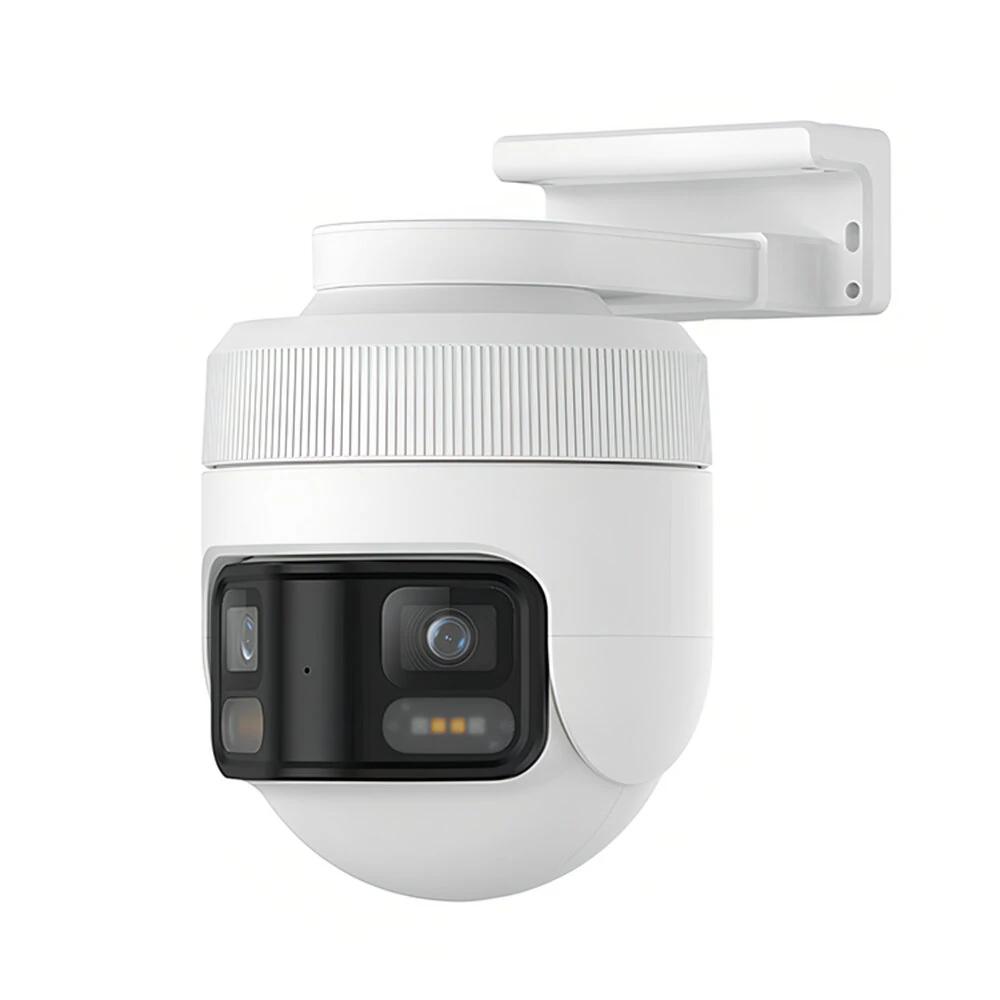
The IMILAB EC6 Panorama camera is, at first glance, much larger than the other cameras in this model series. For comparison, the IMILAB EC6 Dual measures 104 x 145 x 137 mm, while the new EC6 Panorama has dimensions of 128 x 192 x 201 mm.

It’s made of plastic, which isn’t exactly top-tier, but since we essentially don’t handle the camera much during operation, the quality is sufficient.
Layout of components and rotation options
The standout feature is a pair of lenses housed in a large black module at the front. Under each lens, there are also sensors and LED diodes for illuminating in the dark.

Despite the wide viewing angle, it also supports rotation in both directions. In the horizontal direction, it’s 344° and in the vertical direction 90°. That way, the camera easily delivers 360-degree coverage, even with a smaller rotation range.

The camera also has a microphone and a speaker, which are used for recording and transmitting audio. The memory card slot is, together with the reset button, hidden under a sealed cover on the back. To open it, you’ll need a small Phillips-head screwdriver.
It’s a shame the manufacturer doesn’t include such accessories. There’s also no pin for pressing the reset button in the package. To reset the camera, you’ll need some kind of wire or a pin to open the SIM card slot on smartphones.
Mounting, connecting, and pairing with the app
We can mount the IMILAB EC6 Panorama camera either on a wall or even on the ceiling. This is made possible by the integrated stand, which has pre-drilled holes for screws in both directions. The box includes screws and wall plugs, so you can fix the camera to both wood and a brick/concrete wall.

We chose to mount it to a vertical wooden structure of our garden shed, so we didn’t use the wall plugs. If you need to drill holes, there are also self-adhesive drilling templates available to make this task easier.
You need to plug the camera into a power outlet using the included adapter. As for the internet connection, you can choose between wireless WiFi or a wired connection using an RJ45 connector. The manufacturer also provides a cap for additional waterproof sealing. It’s a shame the package doesn’t include a blanking cover for when we’re not using the wired connection—that’s actually our case.

Once we mounted the camera in place and connected it to the power, we proceeded with pairing it with the app. Of course, you can do this beforehand too, which is probably better and easier.
IMILAB EC6 Panorama works with the Xiaomi Home app, which detected the camera automatically right nearby. The whole process of adding the camera is very simple and quick. Each step is clearly described, so you just need to follow the app instructions.


One of the steps is scanning the QR code, which should be located on the camera. The app is a bit tricky here, because the QR code isn’t actually on the camera itself, but on the label of the cable that goes to the power outlet.
If you can’t find it, there’s also another way to skip QR code scanning. You can verify the camera with a 4-digit numeric code dictated by the camera itself—of course, in English.
Image quality and display
The smart camera IMILAB EC6 Panorama offers up to 3.5K resolution and a great 180° panoramic view, which the camera builds from two lenses. In the app, you can see a beautiful wide shot—however, if for example you don’t like its slight curve, you can still switch to viewing the two feeds.


So it’s up to you whether you want to see the wide view or the pair of feeds, meaning each lens separately. The image quality is very good, which is something of a standard for IMILAB cameras. For comparison, here’s the same view under different lighting conditions:


You’ll also appreciate smooth zooming in 0.1x steps, up to a maximum 6-times zoom. Thanks to the high resolution sensor, even the maximum zoom is quite usable.

Night vision
There’s, of course, also night vision thanks to infrared LEDs. The classic black-and-white night vision is very good. As an example, here’s a video recorded after dark:
The Xiaomi Home app also offers colored night vision in the settings, where LED diodes turn on for classic lighting. On the following image, you can see a clear example of how this colored night vision looks:

The third option is a smart colored night mode. With a static scene, we see a black-and-white image, but when motion is detected, the lighting automatically turns on—so we should get a colored image.
Notifications and motion detection
Reliability of motion detection is a common problem with Chinese cameras. Unfortunately, we couldn’t avoid certain issues here either. During motion detection, the camera records a short video and sends a push notification to your smartphone. On our OnePlus 11, after the last update, these alerts don’t come through very reliably, but on another smartphone we didn’t have such a problem.

After opening the notification, the recorded short video plays automatically for us—but it’s stored only in the cloud, not on a memory card.
IMILAB EC6 Dual can recognize motion of a person, a motorized or non-motorized vehicle, or any kind of motion or image change. In the notification, we can already tell whether the camera recorded a person’s motion or something else.


Unfortunately, even motion detection isn’t quite reliable. The camera often alerts for a person moving, even when in reality no person is moving in the field of view. This happens even at low sensitivity. Similarly, detection of any motion – here too, the camera alerts far too often even to the smallest movement, even if we choose a low intensity.
A large number of unnecessary notifications can easily cause you to miss the important ones.


There’s also monitoring of a selected area in the camera’s field of view, but even this feature isn’t very reliable. It’s similar with the camera’s automatic pan/rotation to track a moving person.


The camera also has an audio and light alarm, which we can trigger manually as well.
Two-way audio transmission and storage
Another useful feature is two-way audio transmission, which means you can use the camera for a conversation with someone who’s near it. The audio quality from the camera is good, although the volume could be a bit higher.

A major drawback of IMILAB cameras is that after three months have passed (Xiaomi Cloud trial period), the short videos from notifications become unavailable unless you buy a Xiaomi Cloud subscription for the next period.
We have the same issue with the IMILAB EC6 camera, which we’re still using today. The manufacturer has decided to charge users money—so without a subscription, the short videos from alerts won’t be available.


At least continuous recording to a memory card is missing neither—it’s available even without Xiaomi Cloud. In the recordings afterward, you can see when the camera detected motion, along with color-coded clarity based on the type of activity recorded.

The camera supports microSD cards up to a maximum capacity of 256 GB. However, we ran into a smaller issue here too. The camera wouldn’t take the 64 GB SanDisk card we’re used to using in cameras during reviews. We had to switch to a different one, specifically from Samsung.
There’s also a table from the manufacturer showing how many days of recording fit on a memory card depending on its capacity. We used a 128 GB card, which held 13 days of recording, so the table is almost accurate.
| Capacity | Recording length |
|---|---|
| 16 GB | 36 hours |
| 32 GB | 3 days |
| 64 GB | 6 days |
| 128 GB | 14 days |
| 256 GB | 24 days |
If the card fills up, the camera overwrites the recordings. The app also includes the ability to connect NAS storage.
IMILAB EC6 Panorama: Final evaluation
IMILAB EC6 Panorama is a unique camera that records up to 180° panoramic footage in high, 3.5K resolution. The image quality is truly very good, and it also impresses with 6-times zoom and a quality night mode.

We were slightly disappointed with the reliability of motion detection, since the camera doesn’t always record motion even when the moving person is staying directly in front of the camera. Another drawback is cloud storage for only 3 months. After this trial period ends, short videos from motion detection will probably stop being recorded, just like with other cameras from the IMILAB brand.
Don’t miss the best coupons 📩
Subscribe and we’ll email you new coupons before they expire. We only send it once a month — no spam.