

Review: Wanbo Mozart 1 Pro
Our editorial rating based on product testing.
- elegant design and high build quality
- Android TV system in version 11
- official certification for Netflix
- dedicated buttons on the remote control for popular streaming platforms
- good brightness of 900 ANSI lumens
- high-quality audio output
- sometimes slower responses and noticeable lag between pressing a button on the remote and the action being carried out
- the Pro model could also have come with more improvements, for example higher resolution or higher brightness compared to the standard model
- the cooling fan noise can be distracting at times
- Chromecast for mirroring content from a smartphone doesn’t work
We’ve already tested the Wanbo Mozart 1 projector, but the manufacturer has now released a slightly improved model that offers official Netflix support and a newer Android TV system. The new version carries the model name Wanbo Mozart 1 Pro.
In this review, we’ll look not only at the differences versus the standard version without the Pro label, but also what the Android TV system offers, what you can do with it, and we’ll share our personal experience from using it.
Where to buy the Wanbo Mozart 1 Pro?
The manufacturer of popular Wanbo projectors is bringing its flagship model, the Mozart 1 Pro, to Europe via our partner Geekbuying. The seller has stocked the new item in its Polish warehouse, which means fast delivery to 7 days and completely free shipping.
Wanbo Mozart 1 Pro Projector
 PL warehouse
TIPExpress delivery from a Polish warehouse without customs duty and VAT.
This product will be delivered to you express from a local Polish warehouse. Shipping from Poland usually takes 7-10 days and is handled by a courier. On delivery, you won’t pay any extra fees—no customs duty and no VAT.
Technical specifications
| Model | Wanbo Mozart 1 Pro (WPB84) |
|---|---|
| Dimensions | 176 x 209 x 223 mm |
| Weight | 3.3 kg |
| Display technology | LCD |
| Lens | 5 optical lenses |
| Brightness | 900 ANSI lumens |
| Standard resolution | 1920 x 1080 px (native) |
| Supported resolution | 4K |
| Projection ratio | 1.2 : 1 |
| Corner correction | automatic |
| Focus | automatic |
| RAM | 2 GB |
| ROM | 32 GB |
| System | Android 11 |
| Speakers | 2 x 8 W |
| Noise level | up to 35 dB/m |
| Outputs | HDMI 1.4 / 2 x USB 2.0 / 3.5 mm audio |
| WiFi | dual-band (2.4 and 5 GHz) |
| Bluetooth | 5.0 |
| Certification | Netflix (thanks to Widevine DRM L1) |
Just as good in the dual packaging
We highly appreciate the double packaging—meaning the use of two boxes for better product protection. With Wanbo projectors, this is perhaps already a given, and it’s no different in this case.


The Chinese manufacturer packs the projectors exceptionally well, and besides the two boxes they also add foam supports for extra protection. In the box, besides the projector, you’ll find only the remote control, a power cable, and the user manual.


It’s a shame the manufacturer still doesn’t include batteries in the remote control, which would allow the projector to be ready to use right after unboxing—although we don’t have extra batteries at home.
New color version
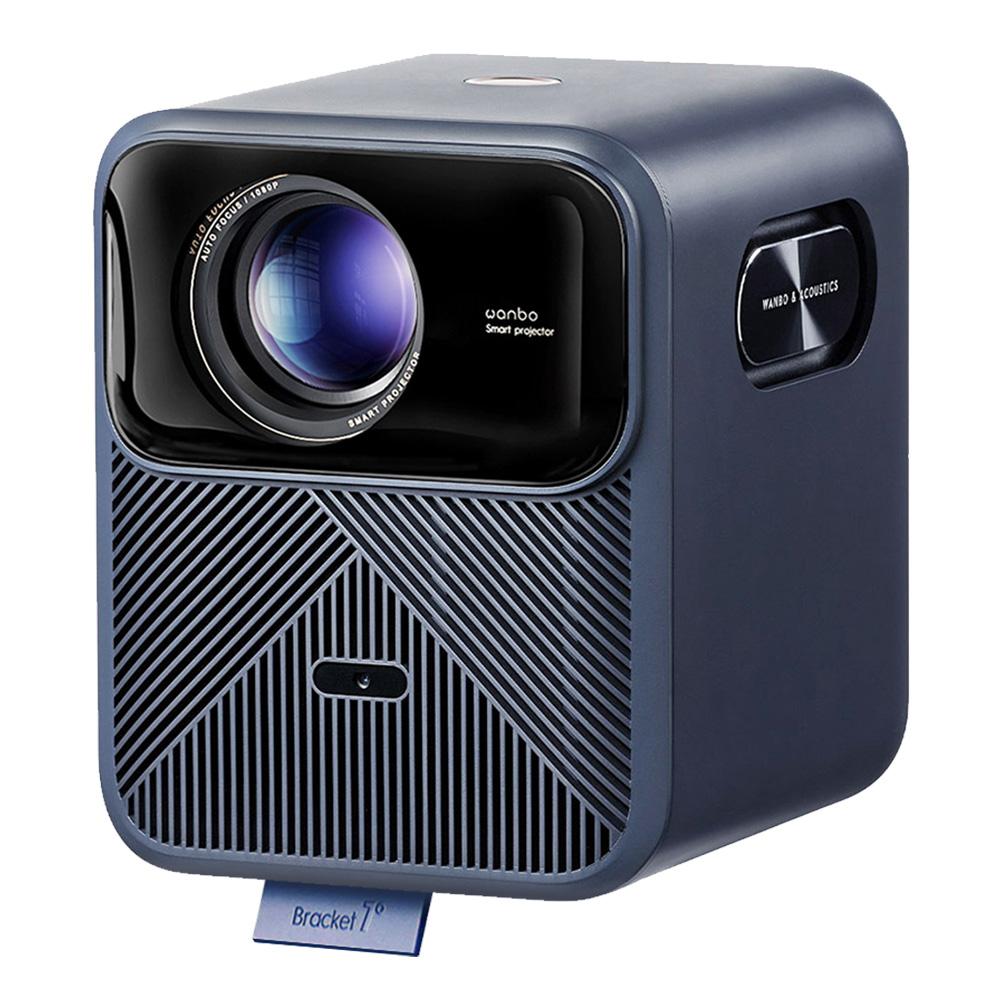
Since the design of this new model is completely the same as the older one, you can tell them apart at least by color. The older model is available only in standard white, unlike the new one, which is made in a dark blue finish.

The dimensions are identical; the new model has lost 20 grams in weight—otherwise the layout of all elements and ports is exactly the same.
As for the controls, nothing has changed here either. The projector only has one large round power button for turning it on and off on the top—everything else is controlled via the remote.

In front, in the cooling grille, there’s also a sensor for automatic focus, and in the back you’ll find the individual ports. Specifically, you get a power port, USB, HDMI, and a 3.5 mm port for connecting standard headphones.
On the side, a design element with the inscription WANBO & ACOUSTICS draws attention. It’s some kind of bass membrane for better-quality sound.
The picture quality stays the same
Even the Wanbo Mozart 1 in the base version already had native resolution 1080p with support for 4K decoding. These parameters didn’t change with the Pro model either, and the brightness of 900 ANSI lumens stayed the same.

From the Pro model, we expected at least a smaller improvement in picture quality, even though we can’t say the older version is bad. The high picture quality is again handled by the five-layer lens technology, PixelPro 5.0.


The image has rich colors and impressive brightness, making the projector usable even during the day with light shading. Of course, the picture looks even better with strong shading or in complete darkness, but unlike cheaper models with low brightness, the image is still relatively clearly visible even in light.
Auto focus and image size
As we mentioned before, the projector has a sensor for automatic image focus, and it works really well. There’s also automatic correction of the trapezoid keystone effect, which appears when you don’t place the projector perfectly perpendicular to the wall and instead project the image slightly from the side. This feature is reliable as well, but with this setup the image is often noticeably reduced, and you end up with a sharpness issue. In this case, it’s not ideal across the entire image area.

The Wanbo Mozart 1 Pro can focus at a minimum distance from the screen or wall of 1.35 m, and up to a maximum distance of 3.3 m. Outside this range, the image gets blurry. Image size also depends on the distance: at the shortest distance it’s 55″, and at the longest it’s up to 120″.
We don’t know the exact hardware
In this case too, the manufacturer doesn’t provide exact hardware specifications for the components used in the projector. So we only know this much: it has 2 GB of RAM, 16 GB of ROM, Bluetooth version 5.0, and WiFi with support for both bands, 2.4 GHz and 5 GHz.
We don’t know the WiFi version or the specific processor.
Newer Android and official Netflix support
With Chinese projectors, the system is often the biggest weak spot. Manufacturers often use a modified Android that’s overloaded with bloatware and various multimedia services we don’t even have in our region.

The Wanbo Mozart 1 Pro is an exception, because here you get the standard Android TV system in version 11. This is where one of the changes compared to the older Mozart model happened—the older one had Android in version 9 with a manufacturer-made custom overlay.
Another new feature is support for Widevine DRM L1, which also gives the projector an official Netflix certification. That means you can enjoy multimedia content from the popular streaming platform in full resolution.

The system has a design that’s not adjusted in any way, meaning the look of the user interface corresponds to a clean Android TV 11. On the home screen you’ll only find Netflix, YouTube, Google Play Movies, and a selection of popular movies or series from Netflix and Prime Video platforms, plus a few suggested apps from the Google Play store.

Support for Slovak and Czech isn’t missing. Unfortunately, the system isn’t perfectly smooth, and its response to the remote control is slower than we’d expect. Between pressing a button on the remote and the projector carrying out the action, you can see a delay.
After the latest Android update, this lag improved significantly, and the overall impression of using it is much better. The UI design has also been slightly changed—you can check it out in the screenshot below.

Settings
In the projector’s own settings (not Android), you’ll find several options. The first ones are image adjustments such as manual adjustment of all four corners, focus, image shrinking, or obstacle avoidance.


Next, you’ll find also picture settings, color temperature (cool, warm, standard, and custom) and adjustments for brightness, contrast, and other parameters.

Then there are sound settings that don’t translate into Slovak very well. Here you can turn the button sounds on or off, or choose one of the sound profiles—where you’ll also find a custom option with more detailed settings.

Remote control and sound
The remote control is compact, with rubberized buttons that press comfortably and have a good response. It needs a pair of AAA batteries, which aren’t included in the package.

It includes all standard buttons such as volume control, switching to the home screen, settings, voice control, and the option to choose a source or set the projection, plus manual focusing.
Thanks to the official projector certification, there are also dedicated buttons for quick access to popular platforms – YouTube, Netflix, prime video, and Disney+.

As for the sound, the projector has two 8 W speakers that play really very well. For projector standards, this is definitely one of the best-sounding projectors from Chinese manufacturers.

The noise level of the projector itself is at a standard level and isn’t disruptive during the day. In the evening, when it’s completely quiet, we notice it more, and you can slightly hear the fan running.
Content playback options
As we already mentioned, the Wanbo Mozart 1 Pro has Android 11 with the classic Google Play Store for Android TV, where you’ll find plenty of different apps. For watching TV programs, we personally used the Antik TV app, but you’ll also find apps from other well-known providers like Magio, Orange TV, or Skylink.

For more multimedia content, there are also apps such as the popular KODI, VOYO, Disney+ and more. Besides apps, however, we also have other ways to use the projector.

Multimedia content can also be played from a USB flash drive, and we can connect a notebook to it via HDMI. Chromecast sharing from a smartphone is also supported. However, we had an issue here, and we couldn’t enable wireless screen mirroring with any Android phone—we couldn’t make it work. The smartphones weren’t able to find the projector. What’s strange is that sharing to the projector from a smartphone via the YouTube app did work.
Wanbo Mozart 1 Pro: Final assessment
The new Wanbo Mozart 1 Pro projector delivers at first glance only small changes compared to the base model, though for some people they can be very beneficial. It’s mainly the official Netflix certification, which it earned thanks to Widevine DRM L1 security.

The projector offers a resolution of 1080p and brightness of 900 ANSI lumens. It provides a bright, high-contrast image with an Android TV system in version 11. We also appreciate the high quality of the audio output.
The downside is occasional slower responses and a visible delay between pressing a button on the remote and the action being carried out. This lag improved after the latest update and sometimes disappears completely, but other times it can be a hassle.
Don’t miss the best coupons 📩
Subscribe and we’ll email you new coupons before they expire. We only send it once a month — no spam.