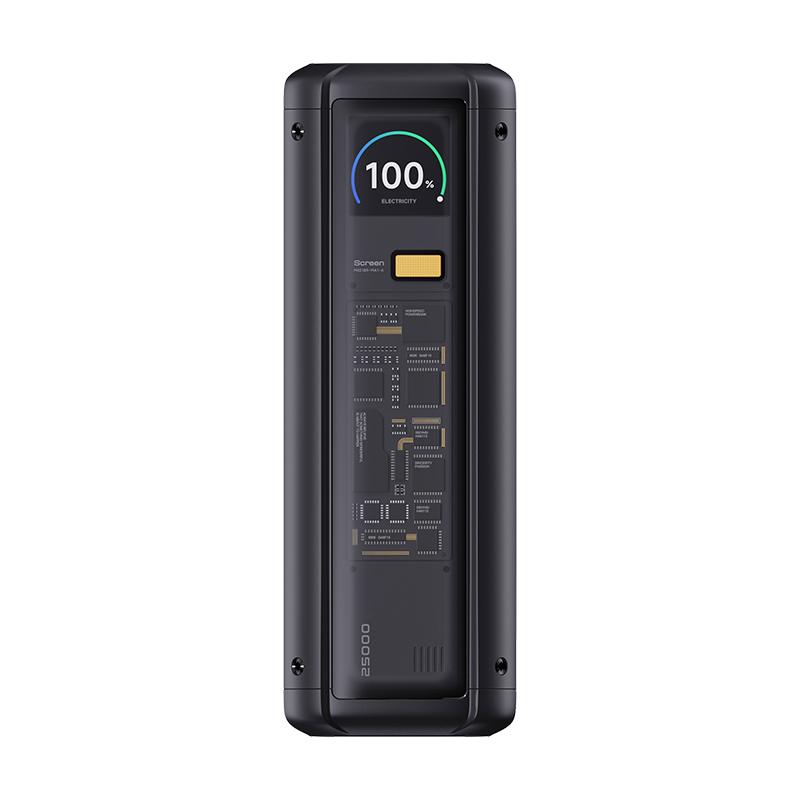
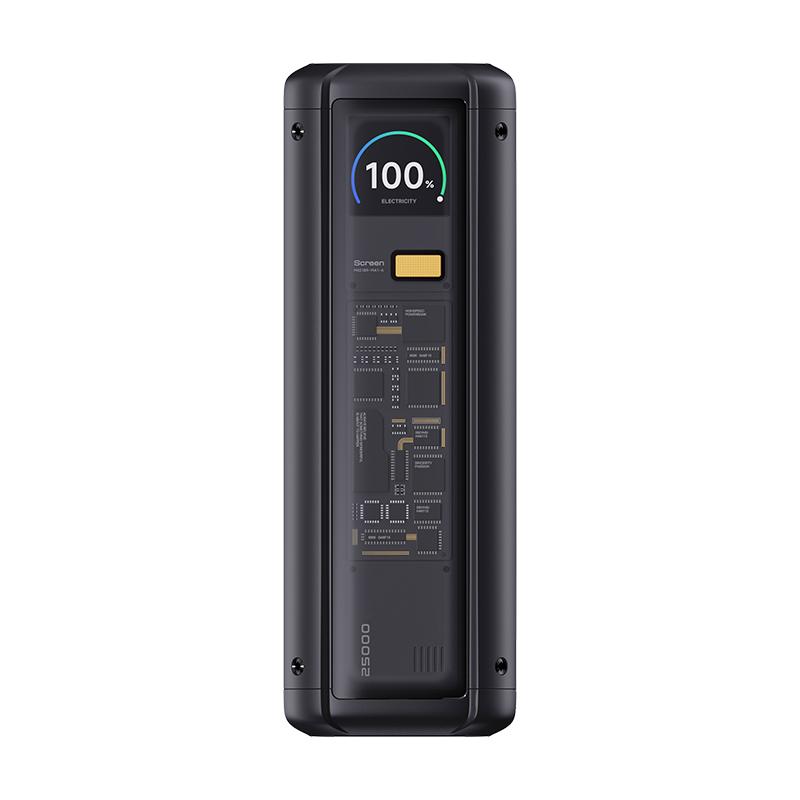
The Xiaomi Power Bank 25000 named power bank delivered, as expected, a beautiful, transparent design. It looks strikingly similar to a model from Cuktech, which belongs under Xiaomi. So the resemblance isn’t just a coincidence.
It’s available only in mainland China, but you can order it from our close partner Gshopper, or also on the AliExpress marketplace for the coupon price. Shipping is free, and you can expect the product to arrive in about 26 days. The price is final and you won’t have to pay any customs duties.
Xiaomi Planet shopping tip: GShopper has now launched direct bank transfer payments, so you can save another 4.5 % off the product price! Compared to card / Google Pay payment, you can get this product much cheaper. We described the full bank transfer payment process in our article.
Is it your first time shopping on GShopper?See the guide!
Updated 10. 9. 2025 on 08:03
TIPWith Standard Shipping via GShopper, you pay no extra fees—everything is already included!
With the GShopper seller, we recommend choosing Standard Shipping, where you won’t pay anything extra. Customs fees and any VAT are handled by the seller. You can select the shipping method in the cart only, after entering your delivery address. Delivery with this option usually takes about 15 business days from dispatch from the warehouse, but it may take longer.
For this product, shipping is available completely free of charge. However, this is the slowest delivery method and the item may take 20 days up to 1 months to arrive.
When ordering from the Chinese warehouse, AliExpress will add the customs duty in your cart—approximately 3,70 € per order. When you receive the package, you won’t pay anything extra.
Our extra service with VIP support — we’ll handle the order on Gshopper for you and ship it straight to your address.
If you don’t have experience buying on Gshopper, payments don’t go through, or coupon use doesn’t work for you, we offer an order handling service directly to your address for our readers and customers. You transfer the money to our account and we place the order directly to your address. This way, you won’t have to worry about a failed payment or applying the coupon, and you can be sure the entire order will go through correctly 100 %. In addition, you automatically get our VIP support — if any issues arise with the shipment, we handle them for you and assist with filing a claim. The fee for this service is €15 extra of the product price. You can contact us by email at info(@)xiaomiplanet.sk or on Messenger, where we’re constantly active.
High capacity and very fast charging
The new Xiaomi power bank has a relatively high capacity of 90.8 Wh, i.e. 25,000 mAh. Still, it’s a capacity that all airlines will accept.
With it, you can charge, for example, a Xiaomi 14 Pro about 4 times, an iPhone 15 5 times, and it will recharge a MacBook Pro notebook to more than half of its battery capacity.
The maximum supported output power of 212 W is split across three ports. The most powerful one enables a 120 W output for Xiaomi smartphones, or 140 W for other supported devices with Power Delivery 3.1.
Xiaomi claims that the USB-C1 output reaches 140 W, USB-C2 goes up to 45 W , and the USB-A finally reaches 120 W. So you get three ports, and thanks to that you can charge three devices at the same time. An intelligent power-allocation system is implemented to ensure stable power delivery to each connected device.
An informative display and a wide range of supported protocols
There’s also a display that shows current statistics, including real-time charging information, the remaining battery level of the power bank, the charging protocol being used, and other interesting data.
Xiaomi Power Bank 25000 supports various protocols, such as PPS, PD 3.1, QC 3.0, Samsung AFC, Apple 2.4A, Huawei FCP, or DCP 1.5A. So you can quickly and reliably charge virtually any device you own.
If you don’t want to miss important info about Xiaomi news, don’t forget to follow the Xiaomi Planet portal and join our Facebook group below, and subscribe to the newsletter. By subscribing, you’ll also get great discounts on products and the best prices at the same time.